Extended Microsite Menu
Basic information
- Our Microsite Menu offers now the possibility to also configure an extended Microsite Menu including meta menu and flyout options
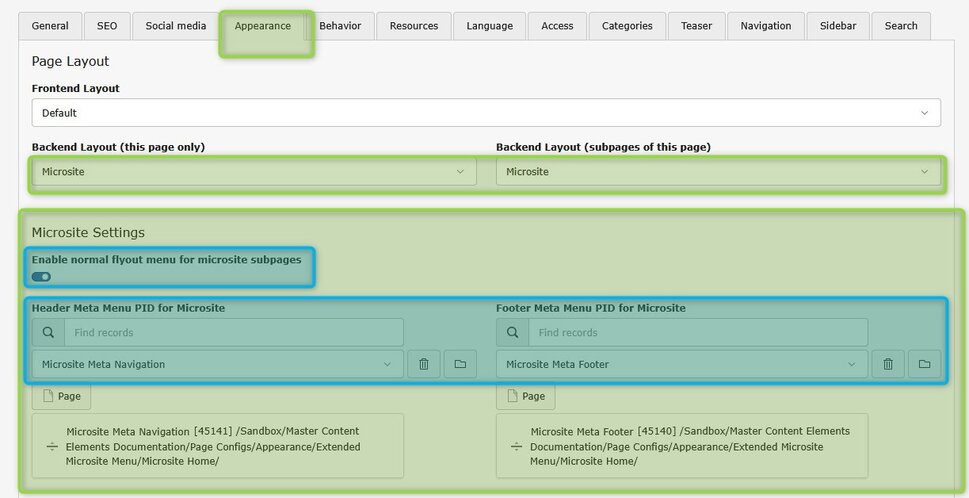
- The configuration is only available in case a page is configured to be “microsite”, then additional configuration options appear
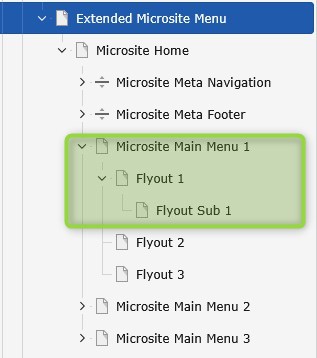
- The Meta Menu as well as the Meta Footer (for legal links) of the microsite have to be maintained as page type “Menu Separator”
- The Meta Menu as well as Meta Footer of Microsites should only contain page type “Shortcut” or “Link to external page” not “Standard pages” an sub structures. Same applies for Meta Footer of Microsite
- Content Footer is inherited by structure or maintained on the related page
- Same applies for Microsite Meta Footer. If not maintained, then inherited by the tree structure
- The “Menu Separator” pages for Meta Navigation an Footer have to be connected/configured in the plugin configuration
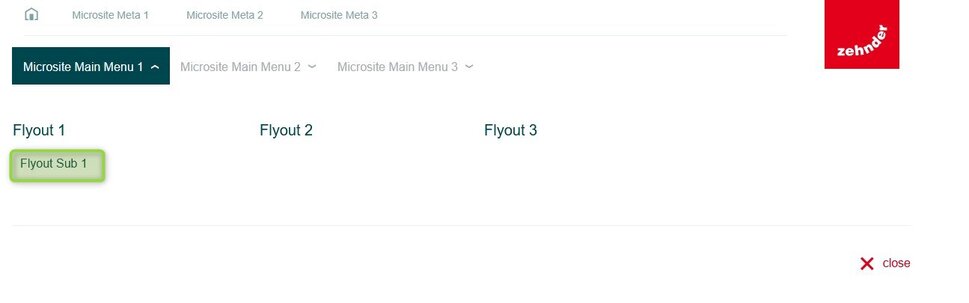
- It is also possible to run the extended microsite menu without flyout menu but only main menu. This can also be configured in the plugin options which appear as soon as “microsite” appearance is chosen.
- Please make sure that “microsite” appearance is activated for all subpages of your microsite menu. Otherwise, click on this item would switch to normal website navigation and microsite menu would disappear.
- The microsite offers same levels connected to the flyout like the regular navigation structure.
Any questions? Please send us a message.
General Request
Contact FormOffer Request
Contact FormService & Spare Parts Request
Contact Form
Any questions? Feel free to give us a call.
General request
+49 (0) 123 45 67Offer Request
+49 (0) 123 45 68